When an AI Agent Calls Your Business
AI agents can already call businesses on behalf of customers. Here’s how to try it with Meta Muse, Grok Bot, or Gemini, and how companies can answer without lowering their guard.

Imagine your repair shop gets a call: “Hi, I’m an AI assistant calling for Maya. Can you replace a cracked Pixel 10 screen this week, and what would it cost?”
Maya has a broken phone. She’s deciding where to spend her money. If you hang up solely because she sent an assistant, you’ve turned away the customer. You just didn’t hear her voice.
I’ve written about what happens when customers send agents to your website. The phone is part of that same shift. It may be where you notice it first, because the assistant can already dial the number you’ve had for years.
What agentic calling actually means
Voice chat is you talking to the assistant. Agentic calling is the assistant dialing someone else for you. You give it a goal and limits. A calling tool connects to the telephone network. The agent can ask questions and respond to what it hears rather than just play a message. Some services can navigate a menu, wait on hold, or hand the call back to you. You review the outcome afterward.
- Brief: The customer sets the task, number, and authority.
- Approve: The customer checks what will be shared before dialing.
- Call: The agent identifies itself and stays within the brief. If it needs more authority, it stops or hands off.
- Verify: The customer gets a result, a reference if available, and any unresolved questions.
Having a phone icon in an app, or a prompt that says “call,” doesn’t give an assistant a telephone tool. If your account can’t actually dial, have it write a short script and make the call yourself. And if it says “done,” check whether it got a firm booking, a provisional offer, or just voicemail. Those are three different outcomes.
What the numbers actually say
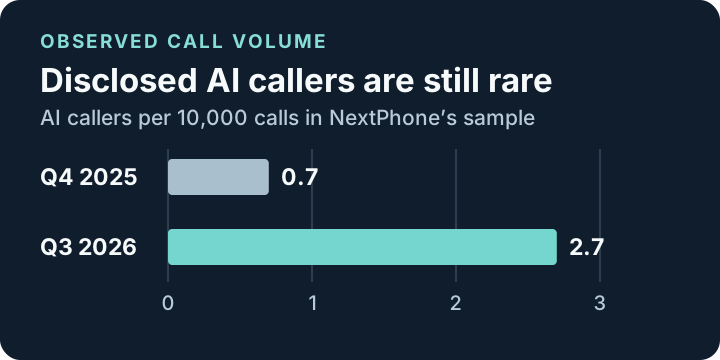
NextPhone’s 2026 report found a rise from 0.7 to 2.7 disclosed AI callers per 10,000 calls between Q4 2025 and Q3 2026, with September alone at 4.0. That was a sample of calls answered by the vendor’s AI across personal and small-business lines, after carrier filtering. As business lines joined during the year, the mix changed; on personal lines tracked throughout, the rise was smaller, from 1.2 to 1.8. The sample misses undisclosed AI callers and includes calls that weren’t made for consumers. It’s evidence of growth in one sample, not a market-wide adoption rate.
In a separate October field experiment, Voygr reported that about one in three San Francisco businesses kept talking after its agent identified itself. The startup reported 848 businesses reached; its continuation measure excluded voicemail, menus, and no answer. These were experimental calls, not authorized requests from actual customers. That distinction is exactly why a business should ask what the caller needs rather than assume every AI call represents a sale.
There’s also a difference between wanting your own assistant and being forced to use the company’s bot. In Gartner’s 2026 survey of 3,566 business and consumer customers, 58% of respondents who use generative AI said they’d used it to complete a task for them. In the same survey, 87% of customers said access to a human was essential when companies use generative AI for service. Neither figure measures phone calls. Together, they point to the difference between choosing to delegate and having that choice made for you.
How to try it: Muse, Grok Bot, and Gemini
Availability checked November 16, 2026. Start with one low-stakes question, one verified business number, and a business that accepts the call. If you want to test the mechanics first, use a controlled test line where everyone involved has agreed and the platform permits it. Don’t use an emergency number, a private number without permission, or a list of businesses to see which ones pick up.
Meta Muse
Meta’s chief AI officer announced U.S. outbound calling for paid Muse subscribers on November 12 (launch coverage). Open Muse on your eligible account and put a calling brief directly into the chat. Give it the specific U.S. business, the branch, the number, and the question. Ask it to pause so you can review the brief, then approve the call only when the app offers an actual call action. If the tool isn’t available on your account, use the script fallback. The phone icon Meta documents for Muse Voice starts a conversation with Muse, not a call to the business.
Grok Bot
Use the Grok Bot desktop or mobile app on an eligible account, not ordinary Grok Voice mode. Open a conversation with a Bot and ask it to call. The first time, review and accept the calling terms if you can comply: the official guide says calling is U.S.-only and describes consent requirements. Review the recipient shown on the card, then choose Call or Cancel. The card shows a live transcript; you can end the call, answer a question from the Bot, or take over when that control is offered. Review the transcript or recording after the call if you need to check an important detail. Mobile plan and device requirements.
Gemini “Call for me”
Google’s setup guide lists eligible U.S. users age 18+ with a Pixel 10 or 11, U.S. SIM, an eligible Google AI subscription, the Phone by Google Public Beta, and the current Gemini app. The device language must be English and access is rolling out. In the Gemini app, add @Call for me to your request if needed, review the number and details it plans to share, then tap Call for me. It calls from your number, discloses the AI and recording, and lets you monitor or take over. This is distinct from Google’s separate Business Profile calls.
Copy-paste prompts
Fill in the brackets and paste into the assistant you’re actually using. A prompt is a brief, not a permission system. Review the native call controls, the information the tool will share, and its recording and retention settings before you approve anything.
1. Check whether your assistant can actually call
Do not call anyone. Can this exact app, account, and device place an
outbound phone call to a US business? Identify the calling tool, not
voice chat. Tell me how I approve a call, what caller ID and details
the service shares, whether it records or transcribes, and how I can
cancel or take over. Mark anything you cannot verify as unknown.
If you cannot dial, give me a short script I can read myself.
2. Ask for a quote without making a commitment
My goal is to get a quote and availability from [business, location]
for [specific job]. Use only this verified number: [number]. Show me
the number, questions, and details you would share. Wait for my
explicit approval and the app's call confirmation before dialing.
During business hours, make one attempt. Tell the person you are an
AI assistant calling on my behalf to ask about [job]. Use only the
details I approved. Follow the service's recording disclosure and
consent rules. Ask for the estimated total, what it includes, and
the earliest available date. Don't book, pay, share credentials,
or leave voicemail. If they decline, thank them and end the call.
Report who answered, what they actually confirmed, any conditions,
and the next step. If the call didn't connect, say so plainly.
3. Book a table, with clear limits
Prepare one call to [restaurant, location, verified number] to book
for [party size] on [date] at [time and time zone], under [first name].
The only acceptable alternatives are [two acceptable times]. Show me
the number and details you'll share, then wait for my approval and
the app's call confirmation before dialing.
Identify yourself as an AI assistant calling on my behalf. Follow
recording disclosure and consent rules. You may accept an in-range
reservation only if there is no deposit, card requirement, or
cancellation fee. If those come up, or they decline to speak with
you, stop and report back. No repeat calls or voicemail.
Read back the date, time, party size, and name. Get a confirmation
number if offered. Tell me whether it was confirmed or just offered.
What companies should do when the phone rings
I don’t think companies should treat a bot as a verified customer. I think they should treat a legitimate request from a customer’s bot as a customer request. That leaves plenty of room to protect staff, prevent abuse, and insist on proof of authority when the stakes go up.
A receptionist can start with: “Who are you calling for, and what are you trying to do? I can answer general questions. If this involves an account, I’ll confirm directly with the customer through our normal process.”
| If the agent wants to… | A reasonable response |
|---|---|
| Check hours, availability, or published prices | Answer the question or give it the official page that does. |
| Request a low-risk booking | Take only the necessary details. Confirm through your normal process and send a reference the customer can verify. |
| Access an account, move money, get private records, or make a binding change | Use the same verified authorization process you’d require from any representative. Offer a secure link, a callback to the number already on file, or direct customer participation. |
| Hide its identity, ignore a refusal, or repeatedly dial | End or rate-limit the interaction. Keep a normal route available for the customer. |
The distinction matters because businesses already deal with spam, voice impersonation, and callers who tie up the line. Don’t use a plausible voice or caller ID as proof of identity. In the U.S., the FCC’s ruling says AI-generated voices fall within the TCPA’s artificial-voice rules. Consent, disclosures, recording obligations, and exceptions depend on the call and jurisdiction. Get compliance guidance before launching a program, especially for outbound campaigns. A customer choosing to delegate an errand isn’t permission to run automated outreach at scale. And if a business opts out of automated calls, respect that. Google’s Business Profile settings are one example of how recipients can set boundaries for a specific service.
Start with one workflow your staff already handle, such as quotes or appointment availability. Document what staff can answer, what requires direct confirmation, and how to hand off without starting over. Test with your own team. Track verified task completion, repeat calls, staff time, and how often a customer needs to step in. If the same question keeps coming in, make the answer easy to find and act on through a maintained service page, booking link, or scoped API. The best agent-ready phone call may be the one nobody has to make.
4. Audit your own business before changing anything
Review our public website, booking options, phone menu script, and
support policies for [business]. Do not call anyone or change anything.
Pick three tasks a customer's AI assistant might bring us. For each,
say what staff can do without verification, what needs delegated
authority or direct customer approval, and where to hand off.
Draft a short receptionist script and a test plan for consenting
internal participants. Cover one normal request, one attempt to get
private information, and one repeat caller. Propose how to measure
completion, staff time, retries, and handoffs. Flag policy decisions
for us to make and cite the evidence for any current gaps.
Customers will keep calling in their own voices. They’ll also send assistants when that saves them time or makes a task easier to manage. You don’t have to say yes to every request. But if a customer delegates a question you’d happily answer for them, give their assistant the answer or a clear next step. They’re still your customer.